
 Ryan Zhang's Blog


How to Conduct a Phishing Simulation

Translation Notice
This article was originally written in Chinese and translated into English with the assistance of AI. The translation has been reviewed and edited for clarity, accuracy, and readability. Please refer to the original source where necessary, especially for technical terms, commands, configuration details, and proper nouns.
With proper authorization, phishing simulations are an important way to assess an organization’s security awareness and defenses. This article covers a disciplined, safe, and controlled 2025 simulation, from information gathering and attack-surface analysis to simulated-page assessment, platform selection, and data collection.
Disclaimer
This article is for lawful cybersecurity learning, research, and defensive improvement only. All operations, examples, and techniques may be used only in explicitly authorized environments, including personal assets, owned systems, laboratories, or systems covered by written authorization.
Never use any technique discussed here for unauthorized penetration testing, attacks, data theft, phishing, disruption of system stability, or any other illegal or non-compliant activity.
Users bear all legal liability, financial losses, and other consequences resulting from violating laws or exceeding the scope of authorization. The author and publishing platform assume no responsibility.
If you cannot confirm that the target environment is authorized, stop immediately.
Types of Phishing
- Social phishing
Attackers contact employees through commonly used social platforms, such as messaging tools and social media, impersonate colleagues, partners, or other trusted identities, and persuade victims to click malicious links, visit spoofed pages, or download files containing malicious content. This type of phishing relies on trust, urgency, or promised benefits. It is difficult to notice and highly deceptive; victims often act without verifying the identity or content, leading to account compromise, endpoint infection, or further abuse of internal systems.
- Email phishing
Email phishing is one of the most common forms. Attackers send messages disguised as official notices, business correspondence, financial settlements, system alerts, or HR documents, directing recipients to click links or open attachments. These emails often closely imitate legitimate messages in sender address, templates, and wording. Some add time pressure, such as “urgent action required” or “your account will soon be disabled,” to lower vigilance. A mistaken action can expose credentials, leak sensitive information, or create endpoint risk.
How to Conduct a Phishing Simulation
In security services, phishing simulations assess an organization’s defenses against social engineering. When a client cannot provide a complete user list or test sample, potential exposure can be assessed through information gathering and attack-surface analysis.
1. Information Gathering (Attack Surface Analysis)
Without relying on internal client data, start with open-source intelligence (OSINT) and analyze exploitable information exposed online:
(1) Search Engines and Public Pages
Search the organization name, historical notices, press releases, and official pages for:
- Public email addresses (such as info@ or hr@)
- Contact and duty-phone numbers
- Combinations of employee names, titles, and contact details
(2) Business-Information Platforms
Business-information platforms can help assess:
- Publicly registered contact details
- Contact information disclosed in tender notices
- Partners and supply-chain relationships (potential lateral risk)
(3) Recruitment and Social-Platform Exposure
Recruitment and professional-social platforms often unintentionally reveal:
- HR, IT, and administrative roles
- Organizational structures and department names
- Employee work-email naming conventions
Simulated-Page and Content Risk Assessment (Non-Operational)
A common question is whether employees can identify highly realistic pages or email content. The focus is not how to create phishing pages, but whether:
- The organization can recognize legitimate domains
- Email-security controls (SPF/DKIM/DMARC) are enabled
- Employees notice unusual redirects, certificate problems, and URL differences
Analyzing the structural complexity and resource dependencies of real business pages helps estimate the cost of imitation and assess whether defensive controls are appropriate.
Building Simulation Pages or Software
By 2025, web pages are relatively easy to reproduce technically. For an authorized training page, one of the simplest approaches is to save the page locally through a browser.
For example, open the page in a browser, press Ctrl+S, and save it locally for inspection.
This usually saves only the main HTML file; CSS, JavaScript, images, and other static resources may still point to the original site or a third-party CDN. When the local HTML is opened directly, common problems include:
- Relative or cross-origin resource paths causing load failures
- Resources returning 403 or failing to display because of the source site’s CORS or access controls
- Broken styles and non-functional interactions
When saving a page for an authorized exercise, download all dependent static resources locally and fix their paths so it renders and runs offline.
For example, saving the blog page currently open in your browser requires more than Ctrl+S; its CSS, JavaScript, and image resources must also be collected to preserve the same appearance.
Phishing-Simulation Platforms
After organizing the target list and preparing a simulation page, the next step is usually a data-collection and management platform. Mature open-source tools are available for authorized exercises, such as Gophish, along with other similar projects that can be selected according to requirements.
In practice, these ready-made platforms often have limitations, such as:
- Inability to export URLs for separate authorized distribution
- Inflexible data fields or collection logic
- Limited page interaction and workflow customization
- Inability to satisfy specialized testing requirements
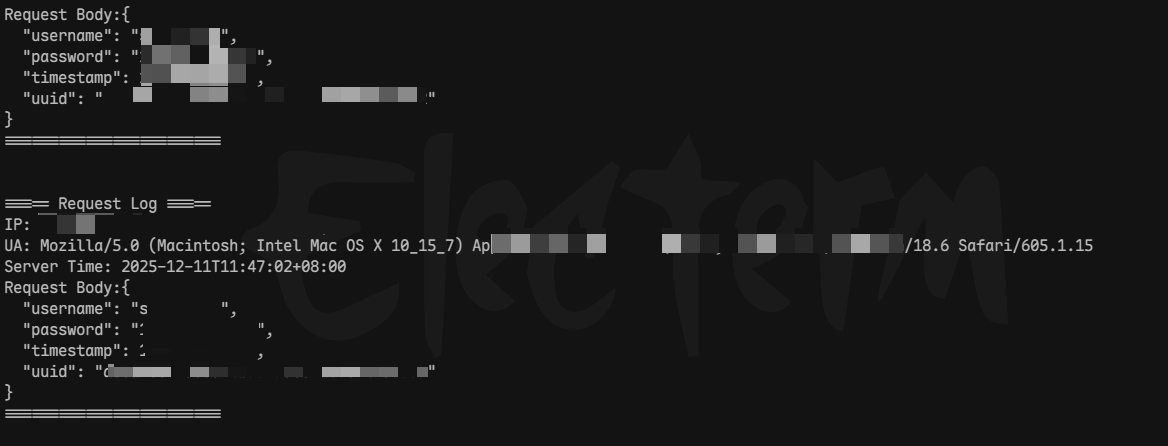
For more complex or customized authorized exercises, existing platforms may need secondary development, or a lightweight collection system may be implemented independently. Technically, a web-based exercise is primarily the recording and analysis of user-submission behavior and data flows. The implementation is not complex: provide an endpoint that accepts HTTP requests and records visits and submissions. To reduce cost, use a general design such as:
- One unified endpoint for different request types
- A unique identifier for each participant, such as a UUID, to distinguish data sources
- A web server, such as Nginx access.log, with log analysis to match paths, parameters, and identifiers
- Use the data for security-awareness assessment or risk analysis, never for exploitation
This approach quickly creates a flexible, controllable exercise environment for internal testing or demonstrations without depending on a complex platform.
Collector Code
The following is a simple collector written in Go with the Gin framework.
package main
import ( "encoding/json" "fmt" "net" "net/http" "os" "strings" "time"
"github.com/gin-gonic/gin")
// LoginRequest defines the request body (matching the JSON fields)type LoginRequest struct { Username string `json:"username" binding:"required"` // Username (required) Password string `json:"password" binding:"required"` // Password (required) Timestamp int64 `json:"timestamp" binding:"required"` // Timestamp (required; seconds or milliseconds) UUID string `json:"uuid" binding:"required"` // Unique identifier (required)}
// Fixed Auth value (replace with your own Base64 string, such as "mysecretkey")const fixedAuthBase64 = "mysecretkey"
// isMobileUA determines whether the client is mobile based on User-Agentfunc isMobileUA(ua string) bool { ua = strings.ToLower(ua) // Normalize to lowercase // Common mobile User-Agent keywords mobileKeywords := []string{ "android", "iphone", "ipod", "ipad", "windows phone", "mobile", "blackberry", "webos", "iemobile", "opera mini", } for _, kw := range mobileKeywords { if strings.Contains(ua, kw) { return true } } return false}
func main() { // Initialize the Gin engine r := gin.Default()
// Load HTML templates (template directory: templates/*.html) r.LoadHTMLGlob("templates/*")
r.GET("/page/:uuid", func(c *gin.Context) { uuid := c.Param("uuid") // Get the UUID from the path userAgent := c.Request.UserAgent() // Get the client User-Agent isMobile := isMobileUA(userAgent) // Check whether the client is mobile templateName := "desktop.html" // Default desktop template if isMobile { // Use the mobile template for mobile devices templateName = "mobile.html" } // Render the template and pass the UUID (available as {{.UUID}}) c.HTML(http.StatusOK, templateName, gin.H{"UUID": uuid}) })
// Register the login endpoint (POST /api/login) r.POST("/api/user", loginHandler)
// Start the service (port: 30494) fmt.Println("Server running on http://localhost:30494") if err := r.Run(":30494"); err != nil { panic(fmt.Sprintf("Failed to start server: %v", err)) }}
// loginHandler handles login requestsfunc loginHandler(c *gin.Context) { // -------------------------- 1. Validate the Auth header -------------------------- authHeader := c.GetHeader("Auth") if authHeader != fixedAuthBase64 { c.JSON(http.StatusUnauthorized, gin.H{ "code": 401, "message": "Invalid Auth Header", }) return }
// -------------------------- 2. Parse and validate the request body -------------------------- var req LoginRequest if err := c.ShouldBindJSON(&req); err != nil { c.JSON(http.StatusBadRequest, gin.H{ "code": 400, "message": fmt.Sprintf("Invalid Request Body: %v", err), }) return }
// -------------------------- 3. Get client information -------------------------- clientIP := getClientIP(c.Request) // Client IP userAgent := c.Request.UserAgent() // Client User-Agent serverTime := time.Now().Format(time.RFC3339) // Server time (RFC3339 format)
// -------------------------- 4. Build the log entry -------------------------- requestBody, err := json.MarshalIndent(req, "", " ") // Format the request body if err != nil { c.JSON(http.StatusInternalServerError, gin.H{ "code": 500, "message": fmt.Sprintf("Failed to Marshal Request Body: %v", err), }) return }
logEntry := fmt.Sprintf( "===== Request Log =====\n"+"IP: %s\nUA: %s\nServer Time: %s\nRequest Body:%s\n========================\n\n\n", clientIP, userAgent, serverTime, string(requestBody), )
// -------------------------- 5. Write to the local log file -------------------------- logFilePath := "./api_logs.txt" // Log-file path if err := appendToLogFile(logFilePath, logEntry); err != nil { c.JSON(http.StatusInternalServerError, gin.H{ "code": 500, "message": fmt.Sprintf("Failed to Write Log: %v", err), }) return }
// -------------------------- 6. Return a success response -------------------------- c.JSON(http.StatusOK, gin.H{ "code": 200, "message": "Login request received and logged successfully", "data": gin.H{ "username": req.Username, }, })}
// getClientIP gets the real client IP, preferring X-Forwarded-For when proxiedfunc getClientIP(r *http.Request) string { // 1. Prefer the X-Forwarded-For header forwardedFor := r.Header.Get("X-Forwarded-For") if forwardedFor != "" { // Take the first IP in the proxy chain ips := strings.Split(forwardedFor, ",") if len(ips) > 0 { return strings.TrimSpace(ips[0]) } }
// 2. Without a proxy, use RemoteAddr (format: IP:Port) ip, _, err := net.SplitHostPort(r.RemoteAddr) if err != nil { return r.RemoteAddr // Return the original value on error } return ip}
// appendToLogFile appends data to the log file (thread-safe)func appendToLogFile(filePath, content string) error { // Open the file: append | create if missing | write-only file, err := os.OpenFile(filePath, os.O_APPEND|os.O_CREATE|os.O_WRONLY, 0644) if err != nil { return err } defer file.Close() // Ensure the file is closed
// Write the data _, err = file.WriteString(content) return err}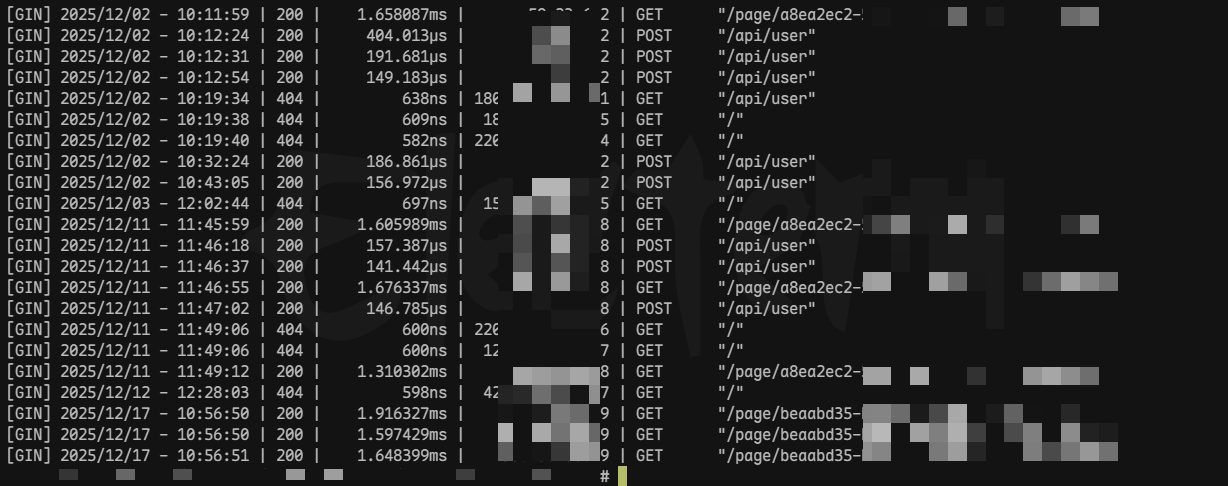
Support & Share
If this article helped you, please share or support!