
 Ryan Zhang's Blog


[Security Tool Vol. 1] Kscan — High-Performance Golang Security Scanner
- 1[Security Tool Vol. 2] testssl — Comprehensive SSL/TLS Security Testing
- 2[Security Tool Vol. 1] Kscan — High-Performance Golang Security ScannerThis article
![[Security Tool Vol. 1] Kscan — High-Performance Golang Security Scanner](https://oss-huating-1.bytesycn.cn/images/2025/10/15/av88ig.png)
Translation Notice
This article was originally written in Chinese and translated into English with the assistance of AI. The translation has been reviewed and edited for clarity, accuracy, and readability. Please refer to the original source where necessary, especially for technical terms, commands, configuration details, and proper nouns.
Introduction
This security-tools series selects useful, approachable open-source tools and provides quick practical guides. Use this tool only with explicit authorization or in a lab environment. Unauthorized security testing may violate the law; use it at your own risk.
TL;DR
Kscan is a lightweight security scanner written in Go. It supports port scanning, fingerprinting, automated brute force, and subnet discovery, with CSV/JSON output. It is suitable for rapid asset discovery and weak-password auditing (authorized scenarios only).
About Kscan
Kscan is a Golang scanner focused on high concurrency and lightweight operation. Common uses include asset discovery, HTTP fingerprinting, external-service liveness checks, and automated password testing based on hydra. Results can be exported as CSV/JSON for delivery or further processing.
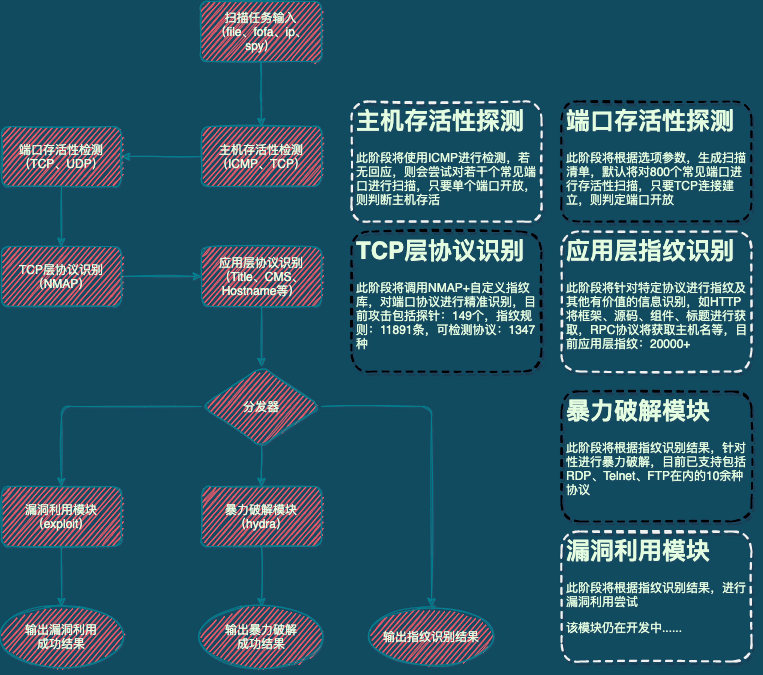
Project Links
Feature Overview
- Port scanning (single port / range / Top N)
- Fingerprinting (HTTP banner / service fingerprint)
- Live-subnet discovery (
--spy) - Automated brute force (hydra integration, multiple protocols)
- CSV / JSON output
Use Cases
- Rapid security-asset mapping
- Fingerprint classification for external services (web, databases, common protocols)
- Weak-password testing and auditing within an authorized scope
Quick Installation (Example)
Assumes that Go is already installed.
git clone https://github.com/lcvvvv/kscan.gitcd kscango build -o kscan ./cmd/kscan# Or use the release binary provided by the author.Command Reference
Common options and brief explanations are listed below:
usage: kscan [-h,--help,--fofa-syntax] (-t,--target,-f,--fofa,--spy) [options]
Common options: -t, --target target: single IP, range, URL, or file (file:/path) -f, --fofa obtain targets from FOFA (requires FOFA_EMAIL and FOFA_KEY) --spy subnet-discovery mode (automatically discover internal subnets) -p, --port port or port range, default Top400 -o, --output save results to a file (CSV supported) -oJ save results as JSON --proxy use a proxy (socks5|socks4|http|https)://IP:Port --threads thread count, default 100, maximum 2048 --timeout timeout in seconds --hydra enable automated brute force (with --hydra-user/--hydra-pass) -Pn skip smart liveness detection (slower but more exhaustive) -sV full-probe open ports (may affect performance; use carefully)hydra options:
--hydra-user username (supports file:username.txt) --hydra-pass password (supports file:password.txt) --hydra-update append a custom wordlist to the default list --hydra-mod limit the brute-force module, e.g. rdp, ssh, ftpCommon Examples (Recommended Forms with Explanations)
Asset mapping (all ports, save results as CSV):
kscan -t targets.txt -p 1-65535 -o output.csvCredential testing (use a custom wordlist and append it to the default list):
kscan -t targets.txt -p 1-65535 --hydra --hydra-user file:user.txt --hydra-pass file:pass.txt --hydra-update -o output.csvSubnet reachability discovery (automatically probe standard Class A/B/C private ranges):
kscan --spy all -o output.csvFast high-concurrency discovery:
kscan -t 198.51.100.0/24 -p 80,443 --threads 500 -oJ output.jsonUsage Recommendations and Performance Tuning
- Concurrency and resources: high concurrency (
--threads) greatly improves speed but consumes more bandwidth and target/local resources. Increase it gradually while monitoring CPU and network; use the maximum carefully. - Timeouts: increase
--timeoutfor unstable networks to avoid misclassifying live hosts. - Avoid false positives: test
--checkagainst a small number of targets first, observe responses, then run it in bulk. - Brute-force strategy: test weak passwords only within an authorized scope. Control the rate and limit the module with
--hydra-modto avoid alerts or account lockouts. - Result processing: export JSON and combine it with tools such as ELK or Pandas for aggregation and visualization.
Frequently Asked Questions (FAQ)
Q: How do I scan only common ports?
A: Use --top, for example --top 100 to scan the top 100 common ports.
Q: How do I disable CDN detection?
A: Add -Dn (disabling it may affect the efficiency of large-scale scans).
Q: How can I improve web-fingerprint accuracy?
A: Use -sV for full probing. It significantly slows scanning, so use it for in-depth confirmation.
Risk and Compliance Reminder
Use Kscan’s port-scanning and brute-force features only with explicit authorization. Scanning or attacking unauthorized targets may be illegal. This site accepts no responsibility for unlawful use.
Conclusion
Kscan is a lightweight and efficient asset-discovery tool for rapid mapping and weak-password auditing in authorized environments. With suitable wordlists, rate limits, and post-processing tools (CSV/JSON), it can produce a deliverable asset inventory and alert list quickly.
Support & Share
If this article helped you, please share or support!