
 Ryan Zhang's Blog


After MinIO's Web Console Disappeared, It's Time for the CLI: An Introduction to mc
Translation Notice
This article was originally written in Chinese and translated into English with the assistance of AI. The translation has been reviewed and edited for clarity, accuracy, and readability. Please refer to the original source where necessary, especially for technical terms, commands, configuration details, and proper nouns.
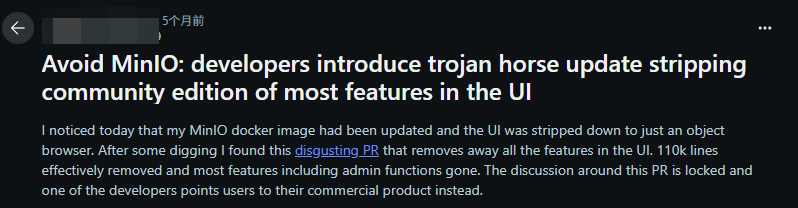
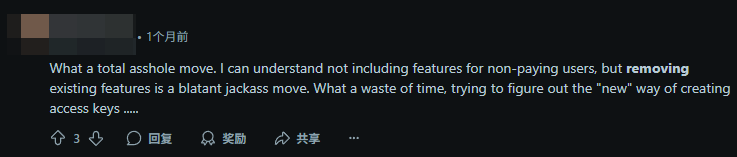
In MinIO’s community releases after 20250524, the open-source object-storage giant radically removed the core Web management console—deleting 110,000 lines of code. The community has widely criticized MINIO for abandoning the open-source ecosystem after benefiting from it. I happened to be using MinIO for a private project, so when the new version arrived without a Web UI, I learned some basic commands with the help of AI and documentation. They are enough to keep permissions and daily usage manageable, so I decided to turn the experience into an article.
A Developer’s Rant

What Is mc?
Don’t get the wrong idea: this mc is not Minecraft, the game where you mine. It is short for MinIO Client, an extremely powerful official command-line tool and the primary way to interact with a MinIO server. It is easy to install in several ways.
Installation
- Download the binary directly (recommended; simple and direct)
# Download mc for Linux amd64wget https://dl.min.io/client/mc/release/linux-amd64/mc# Grant execute permissionchmod +x mc# Move it to a directory on PATH (such as /usr/local/bin/) for global usesudo mv mc /usr/local/bin/- Install with Docker
# Pull the Docker image for mcdocker pull minio/mc# Run a temporary container to execute a command (for example, list the myminio test bucket)docker run minio/mc ls myminioCommand Guide
To see every mc command, scroll to the bottom and visit the documentation at minio.org.cn. This section lists only some common and important commands.
Run mc --help to see all commands. The core categories include:
alias Manage server aliases (connection information) admin Manage the MinIO server (users, policies, configuration, etc.) ... ... (see the official documentation or the common-command details below) ls List buckets and objects mb Create a bucket cp Copy an object mv Move or rename an object rm Delete an object cat Display object contents head Display the beginning of an object pipe Stream standard input to an object put Upload a local file to a bucket mirror Sync a local directory with a remote bucket, or vice versa du Report disk usage diff Compare two buckets find Search for objects ... ... (other important commands include policy, user, config, event, and ilm)Common Commands
Aliases
- Manage connections (alias)
mc alias set ALIAS HOST ACCESSKEY SECRETKEY# Example: connect to local MinIOmc alias set myminio http://localhost:9000 minioadmin minioadmin- List all aliases in the local mc configuration
mc alias list# Example: list all aliasesmc alist list- Delete an existing alias from the local mc configuration
mc alias remove ALIAS# Example: delete the myminio aliasmc alias rm myminioAdministration
- View server information
mc admin info ALIAS# Example: view the status of the myminio servermc admin info myminio- User management
# Add a usermc admin user add ALIAS ACCESSKEY SECRETKEY# Example: add user AK:test SK:123456 to myminiomc admin user add myminio test 123456
# Disable a usermc admin user disable ALIAS USERNAME# Example: disable user test on myminiomc admin user disable myminio test
# Enable a usermc admin user enable ALIAS USERNAME# Example: enable user test on myminiomc admin user enable myminio test
# View user informationmc admin user info ALIAS USERNAME# Example: view information for user test on myminiomc admin user info myminio test
# List all usersmc admin user ls ALIAS# Example: list all users on myminiomc admin user ls myminio
# Delete a usermc admin user rm ALIAS USERNAME# Example: delete user test from myminiomc admin user rm myminio test- PBAC policy management
# Create a policymc admin policy create ALIAS POLICYNAME POLICYPATH# Example: create the listmybuckets policy on myminio using /tmp/listmybuckets.json as its policy documentmc admin policy create myminio listmybuckets /tmp/listmybuckets.json
# Attach one or more IAM policies to a MinIO objectmc admin policy attach ALIAS POLICY [POLICY...] [--user USER | --group GROUP]# Example: attach the listmybuckets policy to user test on myminiomc admin policy attach myminio listmybuckets test
# List all policiesmc admin policy ls ALIAS# Example: list all policies on myminiomc admin policy ls myminio
# Display a policy documentmc admin policy info ALIAS POLICYNAME [--policy-file, -f <path>]# Example: display the writeonly policy on myminiomc admin policy info myminio writeonly
# List entities associated with policies, users, or groups on the target MinIO deploymentmc admin policy entities ALIAS [--user value] [--group value] [--policy value]# Example: list entities associated with policies on myminiomc admin policy entities myminio/
# Delete a policymc admin policy rm ALIAS POLICYNAME# Example: delete the writeonly policy from myminiomc admin policy rm myminio writeonly🔗 Related links
Support & Share
If this article helped you, please share or support!